چارلیپلکسینگ | کنترل یک ماتریس LED با آردوینو
قسمت 44
در قسمت 43 از آموزش آردوینو به روشن کردن چند LED به صورت پشتسرهم، کنترل ماتریس LED با استفاده از مالتیپلکسینگ و نمایش تصاویر روی ماتریس LED صحبت کردیم. در این قسمت قصد داریم کنترل یک ماتریس LED: چارلیپلکسینگ (Charlieplexing) صحبت کنیم.
کنترل یک ماتریس LED: چارلیپلکسینگ (Charlieplexing)
فرض کنید شما یک ماتریس LED در اختیار دارید و میخواهید تعداد پایههای لازم برای روشن و خاموش کردن هر یک از آنها را به حداقل برسانید. چارلیپلکسینگ (Charlieplexing) نوع ویژهای از مالتیپلکسینگ است که تعداد LEDهایی را که میتوان با یک مجموعه پایه محدود کنترل کرد، افزایش میدهد. این اسکچ با استفاده از تنها سه پایه، شش LED را بهصورت ترتیبی روشن میکند.
شکل زیر نحوهی اتصالات را نشان میدهد: (برای محاسبهی مقدار مناسب مقاومت در اتصال LEDها، به قسمت های قبلی مراجعه کنید)
|
1 2 3 4 5 6 7 8 9 10 11 12 13 14 15 16 17 18 19 20 21 22 23 24 25 26 27 28 29 30 31 32 33 34 35 36 37 38 39 40 41 42 43 44 45 46 47 48 49 50 51 |
*/ * Charlieplexing sketch * light six LEDs in sequence that are connected to pins 2, 3, and 4 /* int pins[] = {2,3,4}; // the pins that are connected to LEDs // the next two lines calculate the number of pins and LEDs from the above array const int NUMBER_OF_PINS = sizeof(pins)/ sizeof(pins[0]); const int NUMBER_OF_LEDS = NUMBER_OF_PINS * (NUMBER_OF_PINS-1); byte pairs[NUMBER_OF_LEDS/2][2] = { {2,1}, {1,0}, {2,0} }; // maps pins to LEDs void setup() { // nothing needed here } void loop(){ for(int i=0; i < NUMBER_OF_LEDS; i++) { lightLed(i); // light each LED in turn delay(1000); } } // this function lights the given LED, the first LED is 0 void lightLed(int led) { // the following four lines convert LED number to pin numbers int indexA = pairs[led/2][0]; int indexB = pairs[led/2][1]; int pinA = pins[indexA]; int pinB = pins[indexB]; // turn off all pins not connected to the given LED for(int i=0; i < NUMBER_OF_PINS; i++) { if(pins[i] != pinA && pins[i] != pinB) { // if this pin is not one of our pins pinMode(pins[i], INPUT); // set the mode to input digitalWrite(pins[i],LOW); // make sure pull-up is off } } // now turn on the pins for the given LED pinMode(pinA, OUTPUT); pinMode(pinB, OUTPUT); if( led % 2 == 0) { digitalWrite(pinA,LOW); digitalWrite(pinB,HIGH); } else { digitalWrite(pinB,LOW); digitalWrite(pinA,HIGH); } } |
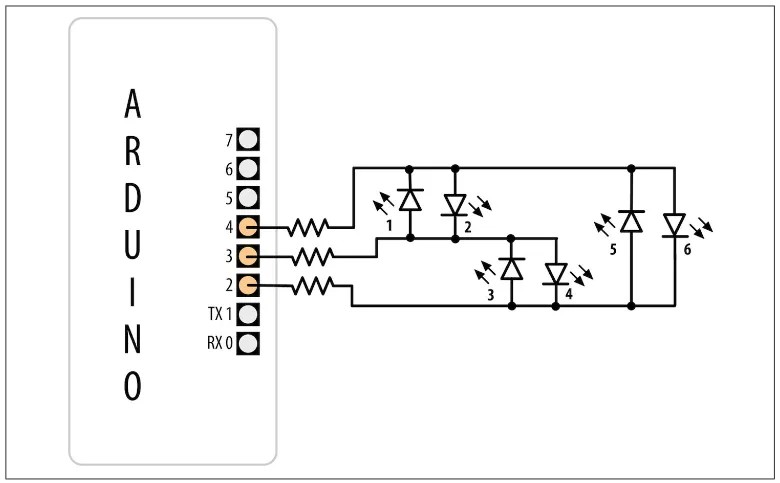
شش LED که با استفاده از سه پایه و به روش چارلیپلکسینگ (Charlieplexing) راهاندازی شدهاند
اصطلاح چارلیپلکسینگ (Charlieplexing) از نام چارلی آلن از شرکت Microchip Technology, Inc. گرفته شده است که این روش را معرفی کرد. این تکنیک بر این اصل استوار است که LEDها فقط زمانی روشن میشوند که «در جهت درست» به مدار متصل شوند (یعنی آند نسبت به کاتد پتانسیل مثبتتری داشته باشد).
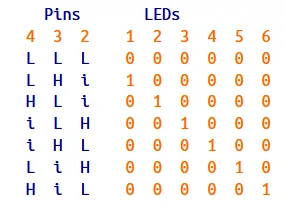
در ادامه، جدولی نشان داده شده است که مشخص میکند برای ترکیبهای معتبر وضعیت سه پایه، کدام LED روشن میشود. در این جدول:
- L به معنی LOW
- H به معنی HIGH
- I به معنی حالت INPUT
قرار دادن یک پایه در حالت INPUT عملاً آن را از مدار جدا میکند.
میتوانید با استفاده از فقط یک پایهی دیگر، تعداد LEDها را به ۱۲ عدد افزایش دهید. شش LED اول به همان روشی که در مثال قبلی توضیح داده شد متصل شدهاند؛ شش LED اضافه را بهگونهای اضافه کنید که اتصالات مشابه شکل زیر باشد.
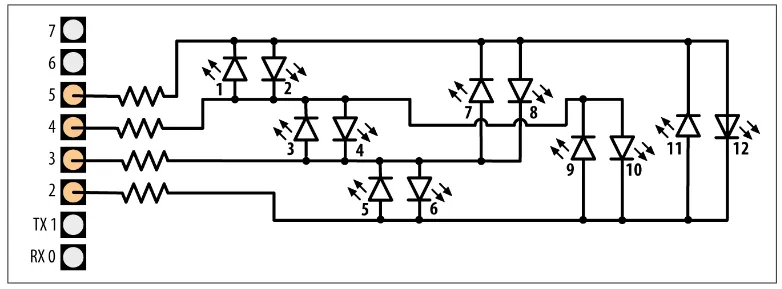
استفاده از چارلیپلکسینگ با چهار پایه برای راهاندازی دوازده LED
کد قبلی را با اضافه کردن پایهی اضافی به آرایهی پایهها اصلاح کنید.
|
1 |
byte pins[] = {2,3,4,5}; // the pins that are connected to LEDs |
ورودیهای اضافی را به آرایهی pairs اضافه کنید تا بصورت زیر خوانده شود:
|
1 |
byte pairs[NUMBER_OF_LEDS/2][2] = { {0,1}, {1,2}, {0,2}, {2,3}, {1,3}, {0,3} }; |
سایر قسمتها میتوانند بدون تغییر باقی بمانند، بنابراین حلقه همهی دوازده LED را پشتسرهم روشن میکند، زیرا کد تعداد LEDها را از تعداد ورودیهای موجود در آرایهی پایهها تعیین میکند. ازآنجاکه چارلیپلکسینگ با کنترل پایههای آردوینو بهگونهای عمل میکند که تنها یک LED در هر لحظه روشن باشد، ایجاد این تصور که چند LED همزمان روشن میشوند، کمی پیچیدهتر است. اما میتوان با استفاده از تکنیک مالتیپلکسینگ که برای چارلیپلکسینگ اصلاح شده است، چند LED را همزمان روشن کرد.
این برنامه یک نمودار میلهای (bar graph) ایجاد میکند و با توجه به مقدار یک سنسور متصل به پایه آنالوگ ۰، توالی LEDها را روشن میکند.
|
1 2 3 4 5 6 7 8 9 10 11 12 13 14 15 16 17 18 19 20 21 22 23 24 25 26 27 28 29 30 31 32 33 34 35 36 37 38 39 40 41 42 43 44 45 46 47 48 49 50 51 52 53 54 55 56 57 58 59 60 61 62 63 64 65 66 67 68 69 70 71 72 73 74 75 76 |
byte pins[] = {2,3,4}; const int NUMBER_OF_PINS = sizeof(pins)/ sizeof(pins[0]); const int NUMBER_OF_LEDS = NUMBER_OF_PINS * (NUMBER_OF_PINS-1); byte pairs[NUMBER_OF_LEDS/2][2] = { {2,1}, {1,0}, {2,0} }; // maps pins to LEDs int ledStates = 0; //holds states for up to 15 LEDs int refreshedLed; // the LED that gets refreshed void setup() { // nothing here } void loop() { const int analogInPin = 0; // Analog input pin connected to the variable resistor // here is the code from the bargraph recipe int sensorValue = analogRead(analogInPin); // read the analog in value // map to the number of LEDs int ledLevel = map(sensorValue, 0, 1023, 0, NUMBER_OF_LEDS); for (int led = 0; led < NUMBER_OF_LEDS; led++) { if (led < ledLevel ) { setState(led, HIGH); // turn on pins less than the level } else { setState(led, LOW); // turn off pins higher than the level } } ledRefresh(); } void setState( int led, bool state) { bitWrite(ledStates,led, state); } void ledRefresh() { // refresh a different LED each time this is called. if( refreshedLed++ > NUMBER_OF_LEDS) // increment to the next LED refreshedLed = 0; // repeat from the first LED if all have been refreshed if( bitRead(ledStates, refreshedLed ) == HIGH) lightLed( refreshedLed ); else if(refreshedLed == 0) // Turn them all off if pin 0 is off for(int i=0; i < NUMBER_OF_PINS; i++) digitalWrite(pins[i],LOW); } // this function is identical to the one from the sketch in the Solution // it lights the given LED, the first LED is 0 void lightLed(int led) { // the following four lines convert LED number to pin numbers int indexA = pairs[led/2][0]; int indexB = pairs[led/2][1]; int pinA = pins[indexA]; int pinB = pins[indexB]; // turn off all pins not connected to the given LED for(int i=0; i < NUMBER_OF_PINS; i++) { if(pins[i] != pinA && pins[i] != pinB) { // if this pin is not one of our pins pinMode(pins[i], INPUT); // set the mode to input digitalWrite(pins[i],LOW); // make sure pull-up is off } } // now turn on the pins for the given LED pinMode(pinA, OUTPUT); pinMode(pinB, OUTPUT); if( led % 2 == 0) { digitalWrite(pinA,LOW); digitalWrite(pinB,HIGH); } else { digitalWrite(pinB,LOW); digitalWrite(pinA,HIGH); } } |
این برنامه از مقادیر بیتها در متغیر ledStates برای نشان دادن وضعیت LEDها استفاده میکند (۰ به معنای خاموش و ۱ به معنای روشن). تابع refresh هر بیت را بررسی میکند و LEDهای مربوط به بیتهایی که برابر با ۱ هستند را روشن میکند. تابع refresh باید بهسرعت و بهصورت مکرر فراخوانی شود، در غیر این صورت LEDها بهصورت چشمکزن دیده میشوند.
✅نکته
|
1 2 3 4 5 6 7 8 9 10 11 12 13 14 15 16 17 18 19 20 21 22 23 24 25 26 27 28 29 30 31 32 33 |
#include <FrequencyTimer2.h> // include this library to handle the refresh byte pins[] = {2,3,4}; const int NUMBER_OF_PINS = sizeof(pins)/ sizeof(pins[0]); const int NUMBER_OF_LEDS = NUMBER_OF_PINS * (NUMBER_OF_PINS-1); byte pairs[NUMBER_OF_LEDS/2][2] = { {2,1}, {1,0}, {2,0} }; int ledStates = 0; //holds states for up to 15 LEDs int refreshedLed; // the LED that gets refreshed void setup() { FrequencyTimer2::setPeriod(20000/NUMBER_OF_LEDS); // set the period // the next line tells FrequencyTimer2 the function to call (ledRefresh) FrequencyTimer2::setOnOverflow(ledRefresh); FrequencyTimer2::enable(); } void loop() { const int analogInPin = 0; // Analog input pin connected to the variable resistor // here is the code from the bargraph recipe int sensorValue = analogRead(analogInPin); // read the analog in value // map to the number of LEDs int ledLevel = map(sensorValue, 0, 1023, 0, NUMBER_OF_LEDS); for (int led = 0; led < NUMBER_OF_LEDS; led++) { if (led < ledLevel ) { setState(led, HIGH); // turn on pins less than the level } else { setState(led, LOW); // turn off pins higher than the level } } // the LED is no longer refreshed in loop, it's handled by FrequencyTimer2 } // the remaining code is the same as the previous example |
کتابخانهی FrequencyTimer2 دورهی زمانی را روی ۱۶۶۶ میکروثانیه تنظیم کرده است (۲۰ میلیثانیه تقسیم بر ۱۲ که تعداد LEDهاست). روش FrequencyTimer2.setOnOverflow تابعی را مشخص میکند که هر بار که تایمر «فعال» میشود فراخوانی شود (در اینجا تابع ledRefresh). کتابخانهی FrequencyTimer2 با تعداد محدودی از بردها سازگار است: Arduino Uno (و احتمالاً اکثر بردهای سازگار با ATmega328)، Arduino Mega و چند مدل Teensy. برای اطلاعات بیشتر در مورد این کتابخانه، میتوانید به صفحهی PJRC مراجعه کنید.





 نویسنده: Arduino captain
متخصص الکترونیک
نویسنده: Arduino captain
متخصص الکترونیک
من کاپیتان آردوینو، اسمم میلاده و اینجا هستم تا تجربیاتم در رابطه با آردوینو رو با شما به اشتراک بزارم!

پالت | بازار خرید و فروش قطعات الکترونیک
قطعات اضافه و بدون استفاده همیشه یکی از سربارههای شرکتها و طراحان حوزه برق و الکترونیک بوده و هست. پالت سامانهای است که بصورت تخصصی اجازه خرید و فروش قطعات مازاد الکترونیک را فراهم میکند. فروش در پالت
آیسی | موتور جستجوی قطعات الکترونیک
سامانه آی سی سیسوگ (Isee) قابلیتی جدید و کاربردی از سیسوگ است. در این سامانه سعی شده است که جستجو، انتخاب و خرید مناسب تر قطعات برای کاربران تسهیل شود. جستجو در آیسی
سیسوگشاپ | فروشگاه محصولات Quectel
فروشگاه سیسوگ مجموعه ای متمرکز بر تکنولوژی های مبتنی بر IOT و ماژول های M2M نظیر GSM، GPS، LTE، NB-IOT، WiFi، BT و ... جایی که با تعامل فنی و سازنده، بهترین راهکارها انتخاب می شوند. برو به فروشگاه سیسوگ
سیسوگ فروم | محلی برای پاسخ پرسشهای شما
دغدغه همیشگی فعالان تخصصی هر حوزه وجود بستری برای گفتگو و پرسش و پاسخ است. سیسوگ فروم یک انجمن آنلاین است که بصورت تخصصی امکان بحث، گفتگو و پرسش و پاسخ در حوزه الکترونیک را فراهم میکند. پرسش در سیسوگ فرم
سیکار | اولین مرجع متن باز ECU در ایران
بررسی و ارائه اطلاعات مربوط به ECU (واحد کنترل الکترونیکی) و نرمافزارهای متن باز مرتبط با آن برو به سیکار






سیسوگ با افتخار فضایی برای اشتراک گذاری دانش شماست. برای ما مقاله بنویسید.